
Table of Contents
On-Page SEO Made Simple : The 2020 Guide

What is On-Page SEO?
On-page SEO is the practice of optimizing individual web pages in order to rank higher and earn more relevant traffic in search engines. On-page refers to both the content and HTML source code of a page that can be optimized, as opposed to off-page SEO which refers to links and other external signals.
In simple term, On-Page SEO refers to the content you create and how you put it on your site to make it rank in search engine like Google.
So, here are the three most important factors in On-Page SEO
Length of your content
This can be confusing as best raking articles can be short (1000 words) as well as extremely long (4000 words) and I have found that on average 2500 words was the sweet spot.
But how do we explain the huge diversity in word counts between best ranking blogs?
Well, this is where the depth of your content as well as the User experience are also major contributing factors.
So you really need to look at it in terms of type of blog post you are posting.
There are 3 main types that really work together :
- First type of Post : The Response Type which is around 1250 words
- Second type of post : The Staple post : 2200 words
- Third type of Post : The Pillar Post : 3500 words
The reason why it is important to write these 3 types of blogs, is not necessarily the word count itself but more how these 3 types relate to the various kinds and depth of queries from Google which seem to complete each other nicely. Some content is quick to produce and answer a specific question whereas another one will take much longer to produce but will also keep your visitor longer on your site.
The order that you follow to write this content is also critical especially as it comes to a brand new website.
For a very new website, it is very difficult to rank. The Response Type in this case is the most efficient as it is very difficult at first to have any success with the other types since you need first to get some credibility and Domain Authority which requires more time and Links. Because these response type are quicker and more targeted they will help in building this in the short term by answering very specific questions and get more links.
So start by doing this, each Response type post should take you a hour max to put together and start by doing as many as possible.
Rich Snippet optimization
What are Rich Snippets ?
Rich snippets are the rich pieces of content that appear at the top of a search page result. They are also known as the quick result boxes or Rich results. They are called Rich versus Regular Snippets as they display additional data that is usually pulled from Structured Data found in a page’s HTML.
This is an example of a regular snippet :

This is an example of a Rich Snippet:
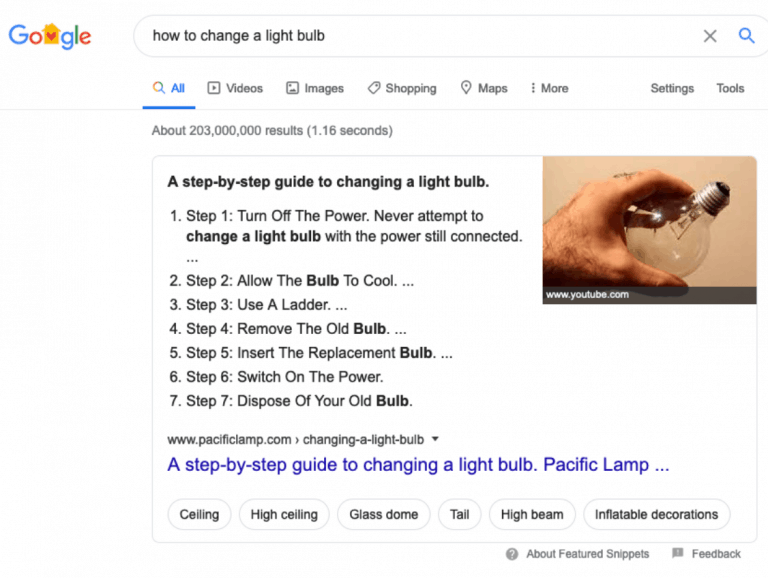
Why are Rich Snippets important?
Check this out what happens when you Search : how to change a little bulb.
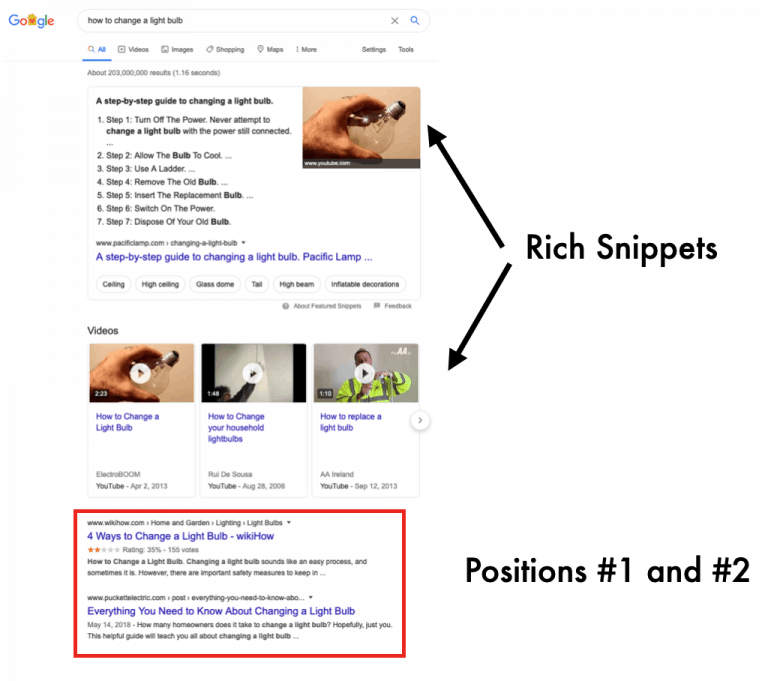
There are many kinds of snippets, paragraphs, bulleted lists, tables, videos, images and more.
This snippet pulls from your content the piece of information that specifically answers the query and includes a link to the blog post where the information is coming from.
So, just for you here are my 5 steps to optimize your content for rich snippet.
5 Steps to optimize your content for rich snippets
This gives you the format of what is being picked up and therefore what you need to replicate somewhere in your content.In the example above, pay careful attention to the title, format, words and other content used.
Step 2 : Click on the rich snippet you have found and look at the way the page is structure and what information have been picked up by Google and how they were combined.
It is likely that the title picked up by Google is the title of the page and that the main body of text and photo come from the content itself and appear almost like a singled out paragraph that summarizes the answer in a few lines.
In the light bulb example above, if you clicked on the rich snippet the header and address would show this :

Google recognized the relevance of the page through the URL ( hence why it should be named after the content it contains) and then identified a paragraph that was easy to pick with a title and the solution/steps in one batch. Note also the importance of the type of query, in this example it was a “how to” query which led to a snippet with Various steps…make sense right?
Step 3 : Format your post properly, meaning make sure that your title is clearly formatted/tagged as either <H2> or <H3> which is standard format for headers, and that your copy is right below it and formatted/tagged <p> which is the standard format for paragraph. This paragraph should be between 54 and 58 words.
If your content is a list or table instead make sure to use the proper Tags; <li> and </li>for a list, <table> and </table> for a table so that Google can identify them easily.
If you are not a developer and do not know the proper tags to use, no worries. Go to schema.org.

And if you are using WordPress, there are plenty of plugins that can do the job for you :

Step 4: Use images related to your content and use the proper description and alt text that included the keywords related to the search. Also, multiple studies have shown that text embedded within an image is actually being picked up by Google. So whenever possible, embed the text in image as per this example:

Step 5: When you write a post, use priming sentences that indicate that an answer is expected and place them as close as possible to the top of your post. A few examples would be :”start here”, “follow these steps” or “this is how”.
Step 6 : A special note : although this should give you a great chance to get picked up by Google for the snippet, this should not prevent you from doing some good organic work and post some high quality content so that you organically rank high in your selected search terms. In fact some surveys have shown that in 70% of the cases, Google selects the snippet from sites that rank between 1 to 10 which by nature Google considers to be most credible and able to answer accurately the question.
Today this technique I just shared with you is widely underused and yet very effective especially for small websites where you have so many factors to rank for and are competing against enormous players. But if you manage to find the key to creating this snippet, suddenly you are catapulted at the top of the Search results page, no matter your size.
Content Quality
The common 4 parts of Each step of the Customer Journey
Part 1: know what your viewer is looking for, meaning what specific question you must answer.
This, of course would come from your keyword research we discussed previously. In case you have an established website, you can also identify what are the most popular pieces of content used by your visitors and focus on making them Best in class pieces if not already.
This also means that you should be also able to identify the pieces that do not work and the ones that are worth reinforcing.
It can also show you where your visitors are dropping out which is probably a good indicator that they are looking for a piece of information that you do not provide and therefore should look into.
Part 2: know when your viewer needs this information.
This includes two elements.
First, the time when you need to post your content (this usually can be determined with your Analytics data as well as some A/B testing)
Second, how much time does your viewer has to consume you content.
Part 3: know what platform/where your viewer is consuming your content.Is your viewer using TV, desktop, tablet, cellphone ?
Do they like to read, listen or watch, use an App during this very step?
Part 4: The trigger which is what makes the viewer go from one step to the next or simply provides access naturally to the next question’s answer.
Since each step is about providing the viewer with one specific answer, at a specific time, for a specific duration and on a specific platform, once the question is answered it will naturally trigger a following action, being the next question or if you are at the end of the Journey, a purchase of product of service.
It is critical that you provide your viewer this trigger to help them in your quest. If you do not they will move on to another site. In the case of a blog the trigger can be as simple as making the next piece of information you believe will be required right at hand once the first question is answered.
Here’s a basic graph explaining how the combination of steps create the Journey.

Step 1 : Bob wants a new TV. He goes on his computer (platform) over the week end (when) to brush up on the latest available technologies (what).
A trigger here could be to provide a guide on what screen size he needs based on a few criteria covered in Step #2.
If it is a calculator, this format needs to be responsive since Bob might be in the Metro on his way to work and might want to use his cellphone for this.
Also if his commute is only 5 minutes long, Bob might not have the time to read a long blog or watch extensive videos at this very moment.
The trigger here might be to take him through the same process to answer the other questions he might have one after the other like : what connectivity he needs, what sound bar could be nice, mounting walls, and towards the end of his Journey, available manufacturers, price bracket, and specific model comparison tools and customer reviews.
You get the idea, keep in mind that your on-page SEO is all about the What first and it is about what people are searching for and not what you would like to talk about at the risk of creating content that will not get consumed.
It is also about the depth of the information you provide. A simple collection of searches on the web will be received as such and not really bring any value to your viewers
Related Articles
Table of Contents
Related Articles
Do you want more online revenue?
Just enter your email below to subscribe to my newsletter and GROW YOUR REVENUE
About Gilles Argivier

He is an International marketing expert and visionary entrepreneur.
For over 20 years, he has been entrusted by world class organizations as a driver of top and bottom line growth through transformational business development, brand’s sustainable strategy, product innovation and powerful online customer centric experiences
He owns and operates his marketing consultancy firm out of the US.
Toolbox
Main Articles
Do you want more online revenue?
Just enter your email below to subscribe to my newsletter and GROW YOUR REVENUE